YANG concepts
If the vocabulary around YANG is new to you, this page explains it through the things YANG Studio actually shows you. Every example below is real output from a Cisco IOS-XE device rather than an invented sample.
The one idea worth starting with: YANG is a schema language, not a protocol.
A .yang file describes the data a device holds. It
defines the shape of the tree, the type of every leaf, and which parts
of it you are allowed to change. What it does not describe is how you
read or write any of that. NETCONF, RESTCONF and gNMI are three
different ways of moving the same tree across the network, and
learning the model is what carries across all three.
What comes back when you connect
When a NETCONF session opens, the client and the device each announce what they support. The device in this example sends back 522 capability strings: 15 that describe the protocol itself, and 507 that describe the YANG modules it implements. Here is one of those 507, exactly as it arrived:
urn:ietf:params:xml:ns:yang:ietf-interfaces?module=ietf-interfaces&revision=2014-05-08
  &features=pre-provisioning,if-mib,arbitrary-names
  &deviations=cisco-xe-ietf-ip-deviation
| Part | Means |
|---|---|
namespace | The module's globally unique identity — what xmlns points at in a request. |
module | Its name. This is the thing you download. |
revision | Which dated version the device implements. |
features | Optional parts it actually implements. Anything behind a feature flag not listed here is not on this box. |
deviations | Where the vendor departs from the standard module. Named modules, themselves downloadable. |
A capability is a promise, not the schema itself. The device
is telling you that it implements ietf-interfaces at that
revision. It has not sent you the model, so at this point you still do
not know what is inside it. Downloading is a separate step.
NETCONF or RESTCONF
The chooser next to Connect decides which protocol is used to find the device's models and fetch them. It is worth understanding what the two actually do differently, because for most devices the answer that comes back is the same either way.
NETCONF reads the capability list out of the <hello>
the device sends when the session opens, and then asks for each module
with <get-schema>. RESTCONF reads the same information
from the device's YANG library over HTTPS, and downloads each module
from the URL the library gives for it. No session is involved.
Run both against the same router and you can see how closely they agree. These are the real numbers from the IOS-XE device used throughout these pages:
| NETCONF | RESTCONF | |
|---|---|---|
| Modules advertised | 507 | 507 |
| Revisions that disagree | none | |
| Modules carrying deviations | 26 | 26, identical |
| Only on this side | ietf-netconf, ietf-netconf-with-defaults |
ietf-restconf, ietf-yang-patch |
The only difference is that each protocol advertises its own modules, which is exactly what you would want. Everything downstream — the repository, the set, the tree — is identical whichever one you picked.
When to choose RESTCONF
- The device does not run NETCONF. Plenty of lab and sandbox devices enable only RESTCONF, and without this there would be no way to get their models at all.
- You are downloading a lot of modules. A NETCONF download is hundreds of requests down one session, and if that session drops part-way the requests after it fail too. Over RESTCONF each module is an independent request, so one failure says nothing about the next.
When RESTCONF will not work
RESTCONF discovery needs two things from the device: the
ietf-yang-library module, and a download URL for each module
listed in it. Most platforms provide both, but listing a module and being
able to fetch its source are separate questions, and there are two ways
the second one goes wrong.
The library has no download URLs. Some devices publish entries carrying nothing but a name, a namespace and a revision. The module list is still correct and still worth having — it pins revisions, features and deviations — but there is nothing to download from. YANG Studio shows a downloadable count next to the module count when the two differ, so you know before you start.
The URLs are published but not served. A device behind a gateway often advertises URLs pointing at its own inside address, on a path the gateway does not proxy. Every fetch comes back 404 even though the module list was perfect. YANG Studio stops after a few of those and says what happened rather than working through the whole list.
There are two versions of the library and devices are split between them, so both are tried. A device can answer both and put the download URLs in only one, so the choice is made on which library is actually usable rather than which replied first. The badge above the module list tells you which one was used.
If the source cannot be downloaded at all
You are not stuck. The module list on its own is the valuable half — it tells you exactly which revisions the device implements, which features it has turned on, and which deviations it applies. Get the model files from elsewhere, such as the vendor's public repository, and upload them into a repository. Then build the set from the device as normal: the files come from the repository and the revisions, features and deviations come from the device, so the set is still pinned to that box.
What you are downloading
When you press Download, YANG Studio makes one request per module
you picked — a <get-schema> over NETCONF, or a plain
GET over RESTCONF — and the device replies with the module's source
text. That text is
the schema. It is meant to be read by people as well as parsers, and
reading a little of it is the quickest way to get comfortable with
YANG:
container interfaces {          // a fixed node — exists once
  list interface {             // repeats; one entry per interface
    key "name";                // what makes each entry unique

    leaf name {                // a single value...
      type string;             // ...of this type
    }
    leaf enabled {
      type boolean;
      default true;
    }
  }
}
Four keywords do most of the work in YANG. A container groups related nodes together and appears once. A list repeats, with one entry per interface or neighbour or route, and it needs a key to tell those entries apart. A leaf holds a single typed value, and that is where the actual data lives. Almost everything else in the language is a refinement of those four.
Why it asks for other modules too
Modules are not self-contained. They borrow type definitions from one another, and they declare that at the top of the file:
// in ietf-ip.yang
import ietf-inet-types { prefix inet; }

// and later
leaf address { type inet:ipv4-address-no-zone; }
So what is an ipv4-address-no-zone? Nothing in
ietf-ip answers that question. The definition lives in the
other file, where it turns out to be a string with a validation pattern
attached. Without that second file, the parser genuinely cannot tell you
what the leaf will accept, what to validate against, or what to suggest
while you type.
That is what the message "will not parse yet — 4 imports missing" is telling you. It is not the app being fussy. The tree cannot be built at all until those files are present.
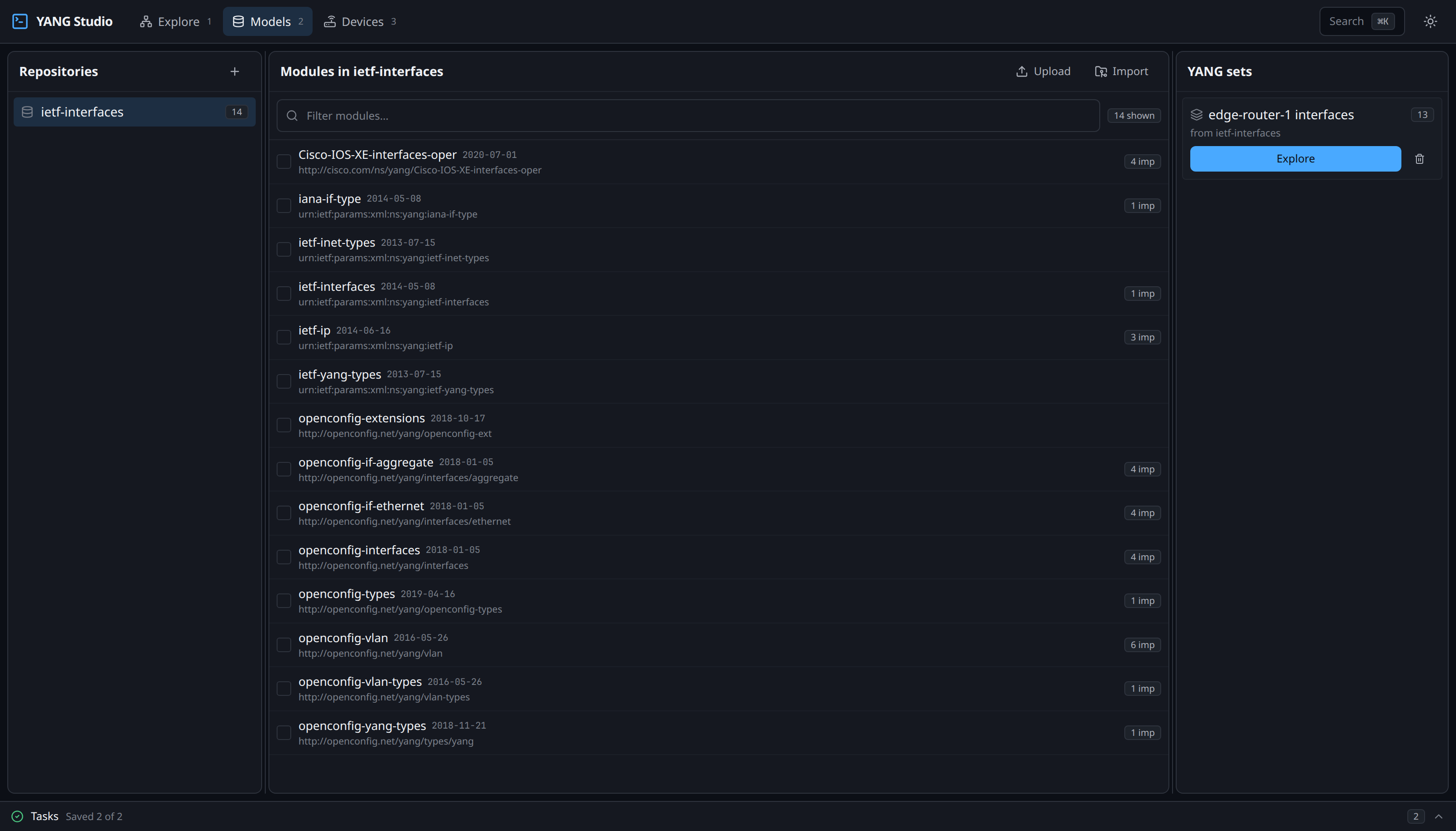
Why a repository and a set
This is the distinction that catches most people out, and it is worth being precise about, because the two answer genuinely different questions.
Repository
"What files do I have?"
A repository is a directory of .yang files — an
inventory of everything you have collected. It is allowed to hold the
same module at several different revisions, and to hold modules that
contradict one another. A filing cabinet does not have to be
internally consistent.
Set
"Which modules resolve into one valid tree?"
A set names specific modules, at specific revisions, that can be parsed together successfully. This is the unit you explore and build requests against, and unlike a repository it does have to be consistent.
You might reasonably ask why the app cannot just parse the whole repository and skip the extra step. These two measurements are the answer:
| Parsed | Modules | Result |
|---|---|---|
| Every BFD module together | 35 | 5 errors — they all augment the same routing path and collide |
| One BFD module | 9 | 0 errors, 250 nodes |
Those BFD modules all add nodes to the same place in the routing tree, so loading them together produces a genuine conflict. On top of that, 23 of the module names in the IETF collection exist at two different revisions, and a single tree can only use one of them. Between the two problems, there is no such thing as "the tree for this repository". Choosing a set is what makes a tree possible at all.
What a set gets you
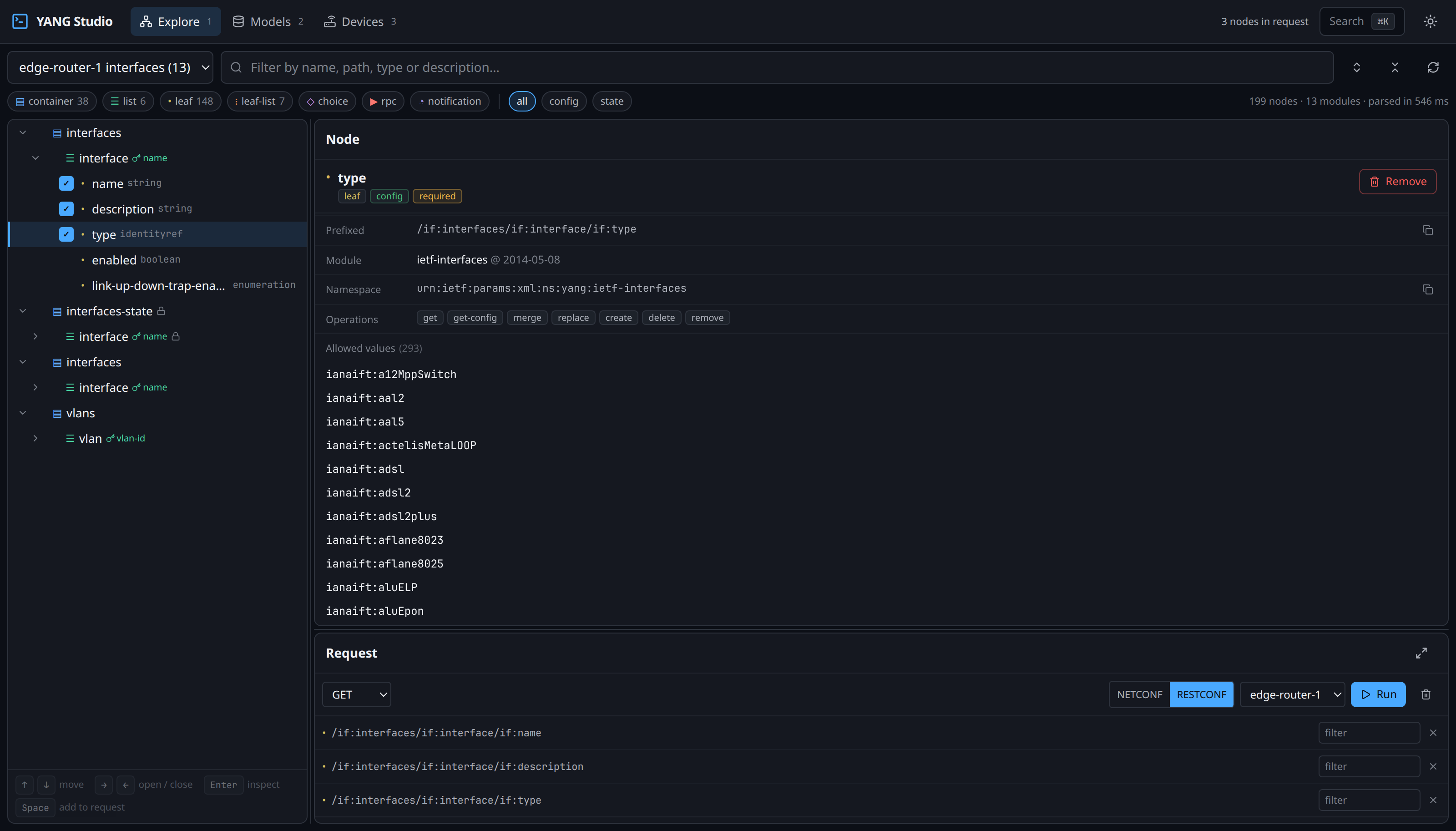
Once a set is parsed, every node in it carries two pieces of information that you will use constantly. The first is a path that addresses it:
/if:interfaces/if:interface/if:description
The second is whether you are allowed to write to it. YANG marks
operational data with config false, and YANG Studio turns
that into a badge on every node:
| Badge | Means | Example |
|---|---|---|
| config | Read and write | interface/description |
| state | Read-only — the device reports it | interface/oper-status |
Attempting to write to a state node is one of the most common mistakes when you are starting out. The badge tells you before you try, rather than the device rejecting the request afterwards.
Features narrow the tree
Parts of a YANG module can be marked optional, and a device declares
which of those it has turned on. The device in these examples implements
pre-provisioning, if-mib and
arbitrary-names, and nothing else. Because YANG Studio knows
that, a set built from the device's own capabilities leaves out the nodes
it does not support — here that removed if-index and
link-up-down-trap-enable.
The difference is small in this example, but on a full vendor model it is the difference between a schema for the product family and a schema for the box actually in front of you.
The vocabulary
These are the terms you will run into while browsing a tree. As above, the first four account for the large majority of what you will see.
container | Groups other nodes. Exists once. |
list | Repeats — one entry per interface, per neighbour. Needs a key. |
leaf | One typed value. The actual data. |
leaf-list | A leaf holding several values of one type. |
key | The leaf making a list entry unique. Becomes a path segment when addressing one entry. |
config false | Read-only operational state. |
typedef | A named reusable type, often with a pattern or range. Frequently in another module. |
identity / identityref | An extensible enumeration. interface/type is one. |
feature | An optional part of a module. The device says which it implements. |
deviation | A vendor's documented departure from a standard module. |
augment | One module adding nodes into another's tree — and the reason modules can collide. |
choice / case | Mutually exclusive alternatives. |
rpc / action | An operation you invoke, with input and output. |
notification | An event the device can push. |
prefix | The short alias for a namespace, seen throughout paths: if:interfaces. |